

Copilot works with your embedded wallet only. Once activated, it runs 24/7—no manual intervention needed.
What Copilot Does
Deposit Idle Tokens
When tokens sit unused in your embedded wallet, Copilot finds the best lending protocol and deposits them automatically.- Detects idle tokens in your wallet
- Selects the highest-yield opportunity available
- Deposits without you lifting a finger
How to Enable
One-time setup through a simple wizard:- Open Copilot in the Hubra.app/earn
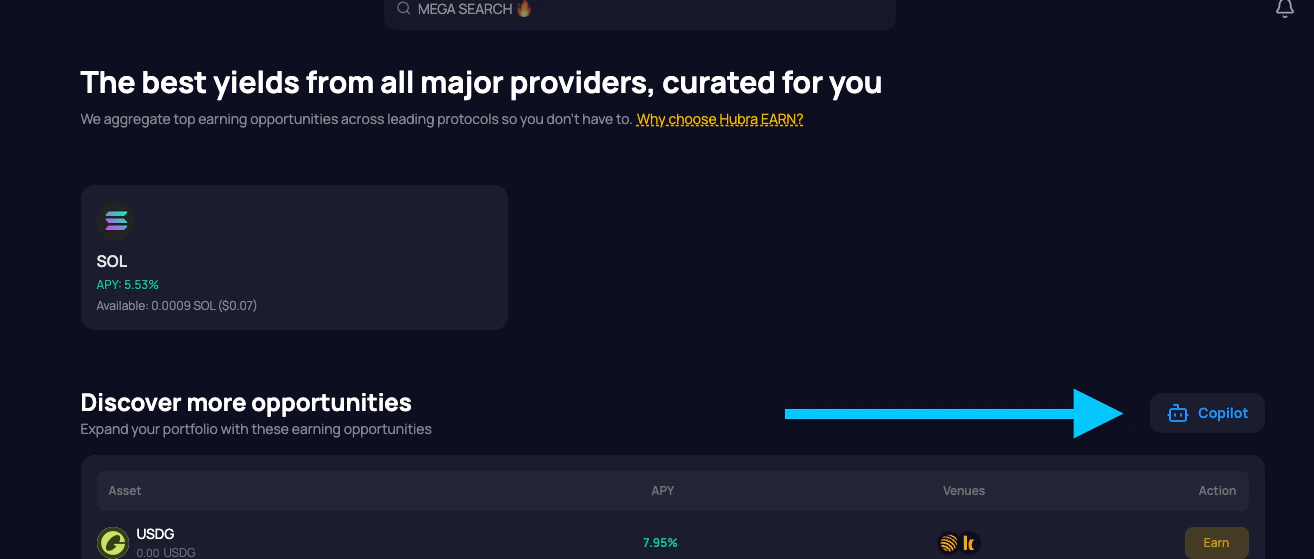
- Grant permission - allows Copilot to sign transactions on your behalf
- Deposit funds to your embedded wallet
- Done - Copilot takes over
What You Control
Enable/Disable: Turn Copilot on or off anytime. No penalties. Deposits: Transfer any supported token to your embedded wallet. Copilot handles the rest. Withdrawals: Withdraw anytime from your portfolio. No lockups, no cooldowns.What You See
Your portfolio shows:- Total balance earning yield
- Current positions with APY for each
- Activity feed - every action Copilot takes, with explanations
Risks
Smart contract risk: Copilot interacts with DeFi protocols. While only vetted protocols are used, smart contracts can have bugs. Variable APY: Yields change based on market conditions. No guaranteed returns. Delegation: You’re granting Copilot permission to transact on your behalf. This is revocable anytime.FAQ
What tokens are supported? All major tokens with available yield opportunities on integrated protocols. Are there fees? Standard blockchain transaction fees only. No additional Hubra fees. How often does Copilot check for opportunities? On a regular schedule optimized for efficiency and gas costs. Can I see what Copilot did? Yes. Every action appears in your activity feed with clear explanations.Get Started
Ready to put your idle crypto to work?- Open the Hubra app
- Navigate to Copilot
- Complete the one-time setup
- Deposit funds and let Copilot handle the rest